

Stories are available on plans that include social publishing, such as Essential and Growth.
Post a Story
Step 1: Create a post
Go to Social Media → Posts, click New post, and select your Instagram and/or Facebook account.Step 2: Add one photo or video
Add one photo, or one video of up to 60 seconds. Stories can’t be text only.Step 3: Choose Story
Open the Instagram or Facebook tab and, under Post format, choose Story.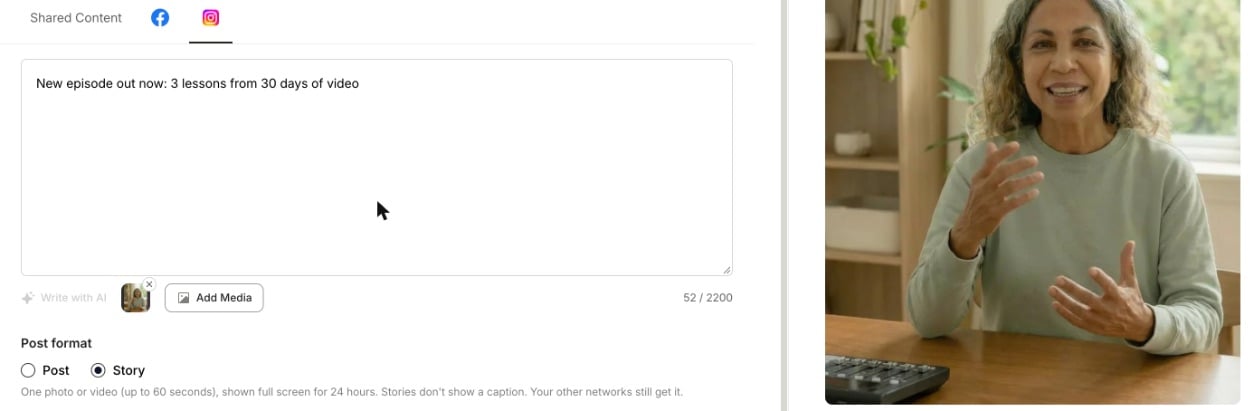
Step 4: Publish or schedule
Click Publish Now or Schedule. Each network’s format is set separately, so you can post a Story on Instagram and a normal post on Facebook from the same composer.What changes for a Story
- No caption is shown. Stories don’t display a caption. Your other networks in the same post still get it.
- One photo or video only, and videos up to 60 seconds.
- Options that don’t apply to Stories are hidden, such as the thumbnail picker, Show this reel in feed, auto-resize and Invite collaborators on Instagram.
FAQ
It says "An Instagram Story needs one photo or video"
It says "An Instagram Story needs one photo or video"
Add a photo or video to the post, or switch Post format back to Post or Reel.
It says "takes one photo or video"
It says "takes one photo or video"
A Story holds a single photo or video. Remove the extra media, or switch the post format back.
My video is longer than 60 seconds
My video is longer than 60 seconds
Use a shorter clip for the Story. You can still post the full video as a Reel or post.