

YouTube auto-import is in Beta and available on paid plans. Each imported video uses your minutes like a pasted link.
Turn on auto-import
Step 1: Find the button on Home
On the Home page, click Auto-import YouTube next to Recent Projects.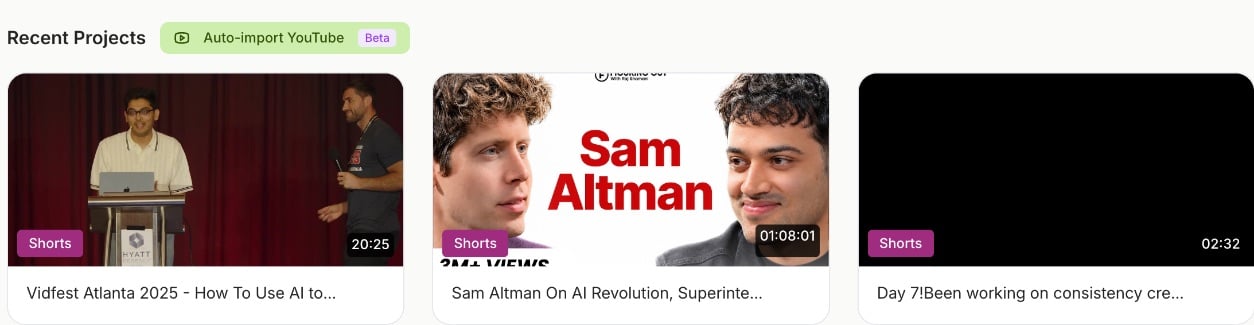
Step 2: Paste your channel
Paste your channel link or @handle, for examplehttps://www.youtube.com/@yourchannel, youtube.com/channel/…, or just @yourchannel.
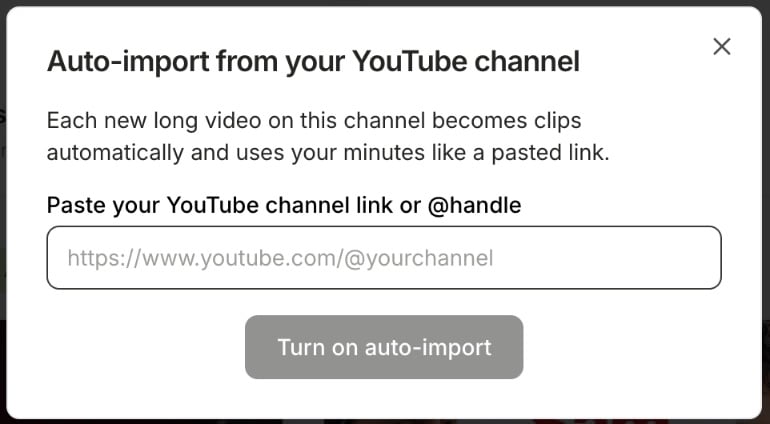
Step 3: Turn it on
Click Turn on auto-import. The button now reads Auto-import on: followed by your channel’s name.What gets imported
- New uploads only. Videos already on your channel when you turn it on are not imported.
- Long videos only. Videos of 3 minutes or less are skipped, which includes Shorts.
- Live streams are imported after the stream ends and the recording is ready. Premieres and scheduled streams are imported once they go live and finish.
- If an import can’t run, for example because you’re out of minutes, quso.ai tries again a few times and then skips that video.
- New videos are picked up one at a time, so several uploads at once are imported one after another.
Turn off auto-import
Click Auto-import on: … on the Home page, then Turn off auto-import. New videos stop becoming clips. You can turn it on again any time by pasting your channel.FAQ
It says "We couldn't find a channel in that link"
It says "We couldn't find a channel in that link"
Paste your channel link or @handle, not a link to a single video. Open your channel on YouTube and copy the address, or use your @handle.
I uploaded a video but no clips appeared
I uploaded a video but no clips appeared
Check that the video is longer than 3 minutes and that you have minutes left. New uploads can take a little while to be picked up. Live streams are imported only after they end.
Does it import my old videos?
Does it import my old videos?
No. Only videos uploaded after you turn it on. To clip an older video, paste its link on the Home page.